⚡ Simple Process
Recover Your Windows PC in 3 Simple Steps
Designed for beginners. Easy step-by-step recovery tools included.
1
Insert the USB Drive
Connect the bootable USB to your Windows PC.
2
Boot & Choose a Tool
Start from USB and choose repair, reset, recovery or reinstall options.
3
Start Recovery
Use guided tools to solve startup issues, restore files or repair Windows. Results depend on system condition.
🛒 Our Products
More Products
SALE
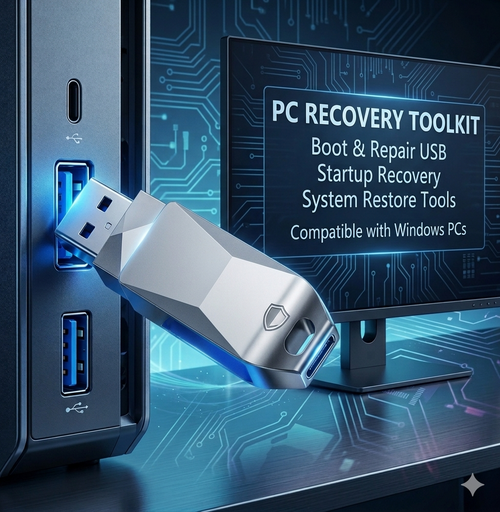
🔧 Bootable Windows Recovery & Repair USB for Startup Issues (Win 11/10/8.1/7)
🔒 Secure Checkout
🚚 Free US & Canada Shipping
🛡️ 30-Day Guarantee
⚠️ Common PC Startup Problems
Blue screen (BSOD) or crash loop
Black screen during startup
PC will not boot properly
Forgot local Windows password
Problems after Windows update
Missing files or damaged system files
This USB helps solve many common startup and recovery issues.
🚀 Why Choose This Recovery USB?
Pre-configured and ready to use
No complicated setup required
Designed for beginners
Useful even when Windows cannot start
Saves time compared with manual troubleshooting
Reusable for future recovery needs
🛠️ What Can It Help With?
Startup repair and boot recovery tools
Help resolve common boot errors
Repair damaged Windows system files
Reset local account passwords
Back up files before reinstall
Windows reinstall assistance when needed
Access recovery tools without internet
🧑💻 How It Works
1
Insert the USB
Plug the USB into your computer.
2
Boot From USB
Use F12 / ESC / DEL / F8 depending on your device.
3
Choose Recovery Tool
Select repair, recovery or reinstall options.
Many recovery tasks can be completed quickly depending on the issue.
⭐ Customer Feedback
“Easy to use and helped me recover my laptop.” — Verified Buyer, Texas
“Saved me from paying a repair shop.” — Verified Buyer, Ontario
“Good tool to keep at home for emergencies.” — Verified Buyer, California
💰 Limited Time Offer
$34.99 $49.99 SAVE 40%
Limited stock available at this promotional price.
🔒 Risk-Free Purchase
30-Day Guarantee — Contact support if needed
Secure Checkout — PayPal & major cards accepted
Tracked Shipping — Free to US & Canada
❓ Frequently Asked Questions
Will it work on my computer?
Compatible with many HP, Dell, Lenovo, Acer, ASUS, MSI and other Windows PCs. Compatibility may vary by model.
Do I need technical skills?
No. Designed for everyday users with step-by-step menus.
Can I reinstall Windows?
Yes. Recovery and reinstall options are available when needed.
Can it reset passwords?
Supports local account password recovery tools for authorized use on your own device.
Is this an official Microsoft product?
No. TechRescueLab is an independent toolkit provider and is not affiliated with Microsoft. Windows is a trademark of Microsoft Corporation.
Will it fix every issue?
Results vary depending on hardware condition, BIOS settings, storage health and software damage.
🛒 Be Ready Before Problems Happen
Keep a recovery USB ready for startup issues, emergency access and system repair whenever needed.
$34.99$39.99
View Product
Usb Sata Cable Sata 3 To Usb 3.0 Adapter Computer Cables Connectors Usb Sata Adapter Cable Support 2.5 Inches Ssd Hdd Hard Drive
1.adpter SATA III USB 3.0 Cable External Hard Drive USB to Serial ATA 22pin Converter Hard Disk 6 Gbps for 2.5" HDD/SSD. 2. This USB 3.0 to SATA Converter Cable connects any standard 2.5 inch SATA Hard Drive or Solid State Drive (SSD) to a computer through USB 3.0 ports. It's a ideal for you to backup files or upgrade your notebook hard driver.3. SATA 3 specification Support speed up to 6Gbps; 4. Easy and quick access to external storage; 5. LED activity indicator; 6. Fully compatible with USB 3.0 and backwards compatible 7. Plug and play,hot-swapping; 8. Support Windows 98/2000/XP/Vista/7/8, Mac OS X.9. Noted: Only available for notebook hard drive and SSD,not available for 3.5 inch deskbook hddComply with serial ATA2.0 standards.Compatible with USB port (1.0,1.1 ) & SATA Hard disk (1.5 GB/S & 3 GB/s).Added USB2.0 independent power supply interface, support 2.5 "high-capacity memory driver.Compatible with Windows 7 (32-bit/64-bit)/Vista (32-bit/64-bit)/XP (32-bit/64-bit)/server 2003 & 2008 (32-bit/64-bit) system A
Packing List:
1 x 22 Pin USB 2.0 Or 3.0 Sata Cable for 2.5" SSD
$20.00
View Product
7 in 1 Multifunctional Cleaning Kit Keyboard Cell Phone Screen Cleaning Artifact Bluetooth Headset Mini Cleaning Pen
Product Name: Headset Cleaning KitMaterial: ABS+Silicone+Sponge+Fiber FlannelNet Weight of Packaged Product: 85gGross Weight of Suit: 110gProduct Size: 143 * 44 * 28mmProduct Package Size: 145 * 44 * 28mmNet Weight of Full Container: 12.3kgGross Weight: 13.3kgCarton Size: 435 * 380 * 260mmPacking Quantity: 120 PCS
$19.80
View Product
ZELOTES Master F36A Vertical Ergonomic Grip Anti Mouse Hand Charging Wireless Office Mouse
Product parametersNumber of keys: 6Tracking System: OpticsFrequency: 2402.85MHz -2480.5MHzEffective distance: 10mWorking voltage/current: 3.7V-4mACharging cable: 1.5 metersButton lifespan: ≈ 5 million timesRoller lifespan: ≈ 1.2 million revolutions per minuteProduct size: 124 * 70 * 67mmProduct weight: 105 ± 5 gramsResolution: 1000-1600-2400DPIReturn rate: 250Hz
$40.02
View Product
P9 keyboard mouse converter set supports various gaming devices and gamepads in the market
Specification:Item name: Keyboard mouse converterBrand/Model: HXSJ/P9Color: BlackMaterial: ABSProduct interface:TYPE-C charging interfaceRated voltage / current: DC 5V / 100mASuitable game consoles: PS4, Xbox One, PS3, Xbox 360, N-SwitchPacking list:1 * Keyboard mouse converter1 * User manual2*TYPE-C Data cable charging cable (100cm length)1*Color box English packagingPRODUCT CONNECTION INSTRUCTIONS:Start the console and connect the adapter via an USB TYPE-C data cable ( USB port plug to the console, TYPE-C port plug to the converter) then LED white light.Plug the original wired controller to guide the yellow LED light.Insert the keyboard then LED red light ;insert the mouse then LED green light.After all connected,the LED will breathe in circulation from yellow,cyan,purple and pink.SETTING INSTRUCTIONS:1、Set Keyboard And Mouse Functions■Press the keyboard ESC + SPACE (space bar) at the same time to enter the function mode of setting the keyboard and mouse buttons (LED blue light)■Press and hold the function button you want to set on the original controller, then press the button on the keyboard or mouse you want to set, and release the button on the original controller and the button on the keyboard or mouse.■After the setting is completed, press ESC + SPACE on the keyboard to save the current setting and exit the setting mode.■For example: press ESC + SPACE (space bar) to enter the setting mode, press and hold the original SWITCH controller A key, and then press the keyboard F key to release the original SWITCH controller A key. The function of the controller A key.2、Note On Keyboard And Mouse Setting Functions:■During the setting process, if you do not hold down the original controller function key or joystick to the end, the original set function of the keyboard or mouse will be cleared■When setting the functions of the original joystick left and right to the keyboard, the direction of the joystick must be pushed to the end, and only the four directions of the joystick up, down, left, and right can be set.■For the setting of the mouse, when the original joystick direction must be pushed to the end, the mouse slides in the corresponding direction, and the mouse only supports the corresponding function of the left and right joystick directions.■Original controller cross key supports 8 directions setting3、Mouse Speed Adjustment:■The product supports mouse movement speed adjustment, the default is the third gear.■Shaft speed adjustment: ESC + CAPSLOCK+A/ S/ D/ F / G4、Mouse Y Axis Direction Switch:The control of the Y axis of some games is opposite to the set value.The game operator can adjust the Y axis direction of the mouse according to his needs by pressing ESC + R.5、Function Switching Instructions:■Enter setting mode: ESC + SPACE■Default page 1: SC+ CTRL + Q■Exit setting mode: ESC + SPACE■Mouse speed switch: ESC + CAPSLOCK+A/ S/D/ F / G■Y axis plus reverse: ESC + R■Page area selection: ESC+ TAB+Q /W/ E/ R/ T■Key value restore default: SC + CTRL + ALT (long press for 3 seconds)6、Upgrade Instructions:(you cannot upgrade at will without the correct upgrade program)■On a Windows computer, open the upgrade software. When the converter does not enter the upgrade mode, "Update rm ware" is light gray.■Connect the converter to the computer through the USB data cable. At this time, the converter's white LED is on, plug in the keyboard and the red LED is on. Press the keyboard SC+ CTRL + ALT + SPACE and hold it for 3s. At this time, the "Update rm ware "Is black, click the button"Update rm ware "to update the converter rm ware.■The OK window pops up and displays "Update Success", indicating that the upgrade is complete. Click OK.SETTING INSTRUCTIONS :I The conversion box is connected to the console and not connected to the external devices, and is displayed as a white light.■Insert the original controller to guide and display the yellow light,insert the rst device to light red, then insert another device to turn on the green light, successfully turn yellow, and then the color of the breathing light will turn yellow, green, purple and pink (circulation).Each color breathes 4 times to change one color.Press the set key function to light up blue. PRECAUTIO NS:■To ensure the normal use of di erent consoles by keyboard and mouse, you must use the original controller (supporting wired functions) corresponding to each platform to guide.■The keyboard and mouse interface cannot be connected to the controller.■Supports 95% of keyboards and mice on the market. If you encounter incompatibilities, please provide the actual product to customer service for up grade.
$38.64
View Product
Customized mechanical keyboard TYPE-C wired green axis, red axis, tea axis, black axis
Mechanical KeyboardKey number: 68keysThe product type: Mechanical Keyboard Blue switchInterface: USB Wired (TYPE-C)System support: Windows xp/Vista/Win7/8/10/11
$48.18
View Product
Computer camera with built-in microphone, AF autofocus, USB high-definition night vision, live streaming, video conferencing, online courses
Product Specifications:Photosensitive chip:CMOS 1/2.9”Pixel Size: 2.8µm x 2.8µmSNR max: 38 dBCamera Focus: Fast AutofocusFrame rate: 60FPSMicrophone: Built-in dual noise-cancelling digital microphonesMax Dynamic range: 81 dB linear mode/105 dB HDR modeMinimum illumination:0.1Lux at F12F/No: 2.0EFL: 3.5mmFOV: 80°IR: 650±10nmLine length: 150cmLens Construction:1G4P+IRMaximum resolution and frame rate:1920*1080 (60fps@full size)、640*480 (60fps) 1280*720 (60fps) 1280*960(60fps)Other optional resolution ratio: YUV / MJPGSupport format: 5V±5%USB power supply voltage: Universal USB2.0/3.0 interfaceConnect the interface: 480mb/sOperating system request:2.2W(Add fill light)Power Consumption: 0°C to 50°CWorking temperature :-10°C to + 60° Package List:1 * 1080P auto focus 60FPS HD camera1 * Six language manuals Support System :Windows XP/ VISTA/ Win7/Win8/ Win10/Linux 2.6.24 ,Ubuntu,Mac OS 10.6,Android5.1 Instructions for use:●USB 1080P auto-focus cameraSupport all plug-ins and playback functions of Windows,OSX/Macos and all other devices. After connecting thecamera to the USB port of the computer, you can use thevideo SW to use the camera.●To use the camera's built-in microphone, you must inputUSB audio in the program settings.●If the camera cannot be automatically recognized when thecomputer is turned on, please connect another USB port andrestart the computer.●Windows 10 users can use the camera application of OSEmotion.-To use the camera in other applications, you need toactivate the camera in the Windows security settings. Precautions:●If the network camera becomes hot after running it for a long time, itisbest to stop using it for a while.●Do not touch the lens with fingers or sharp objects. ·Use a cleanand softcloth when cleaning.●Do not use in high temperature, low temperature, dusty or humidplaces.●Do not drop the camera, as the impact may cause damage to thelens,internal malfunction or scratches on the surface of the camera.
$70.00
View Product
High-Speed 1TB 2TB 4TB 8TB 16TB SSD Silver M.2 Stick 480MB/s Instant Delivery
Case Material: Aluminum AlloyHard Drive Capacity: 16TBCapacity: Black 1TB, Black 2TB, Black 4TB, Black 8TB, Black 12TB, Black 16TB, Black 20TB, Black 32TB, Black 64TB, Red 1TB, Red 2TB, Red 4TB, Red 8TB, Red 12TB, Red 16TB, Red 20TB, Red 32TB, Red 64TB, Blue 1TB, Blue 2TB, Blue 4TB, Blue 8TB, Blue 12TB, Blue 16TB, Blue 20TB, Blue 32TB, Blue 64TB, Silver 500GB, Silver 2TB, Silver 4TB, Silver 8TB, Silver 12TB, Silver 16TB, Silver 32TB, Silver 64TBSpecifications:Type: 1TB/2TB/4TB/8TB/12TB/16TB/26TB/32TB/64TBColor: Red/Black/Blue/SilverMaterial: Aluminum alloy+plasticInterface: USB3.0 / Type-C interfaceAvailable format: ExFATProduct size: 12.2cm*8.1cm*1.3cmApplicable system: only applicable to windows 10, 8, 7, xp and mac os Storage temperature: 0℃~40℃The package: Mobile hard disk * 1 USB data cable * 1 Manual * 1Notice:1. The NTFS format cannot be used, otherwise the product may be damaged.2. Formatting can only be performed on Windows. The exFAT format must be selected when formatting for the first time (emphasis).3. The mac can only store files and data, remember not to format it.4. This product is not suitable for ps4, not for xbox and other game consoles.5. Optional external hard drive with a capacity of 1T /2TB/ 4TB/8TB/12TB/16TB/26TB/32TB/64TB.Specification:Type: External SSD hard diskMaterial: aluminum alloySize: Approx. 1.8''Color: as picturedsuitableCompatible with: Windows XP/Vista/7/8/8.1/10, OS X 10.6 and Linux Kernel 2.6, OTG Supported Mobile Devices Compatible System Android 5.0 and aboveFeature:1. USB 3.1 high speed transferhigh transmissionSpeed for data-heavy, fast applicationsfile transfer. Read speeds up to 300 MB/sWrite speed up to 370 MB/s;2. Large capacityStore your entire world and songs, documents, pictures and videos for your work and study needs;3.OTG connectorUSB-C interface cable + USB-A to C interface, direct connectionDrive to your phone and access your files instantly;4. Ultra-thin and portable designSpace-saving SSD, convenient for users to carry;5. Shockproof and shockpro
Dimension
Length
Width
Thickness
Product Size
3.9in / 10cm
1.26in / 3cm
0.35in / 0.9cm
--The mobile solid-state drive gives you easy and efficient access to large amounts of data, allowing you to get things done quickly on the go. Wherever you go, you can take documents, large photos, or videos with you to get everything ready.
$26.50
View Product
⭐ Customer Reviews
What Our Customers Say
4.9
★★★★★
Based on 218 reviews
100% recommend
M
Mike T.
March 12, 2026 · 🇺🇸 Texas, USA
★★★★★
Saved my laptop before a work deadline!
My PC hit a BSOD loop 2 days before a major project. This USB fixed it in under 20 minutes. No tech skills required — just followed the on-screen steps. Absolute lifesaver.
✅ Verified Purchase
S
Sarah K.
Feb 28, 2026 · 🇨🇦 Ontario, Canada
★★★★★
Best $30 I've ever spent on tech
Used it on my kids' old laptop that wouldn't boot. Reinstalled Windows in about 25 minutes, now it runs perfectly. Way cheaper than a repair shop. Highly recommend.
✅ Verified Purchase
D
David R.
March 5, 2026 · 🇺🇸 California, USA
★★★★★
Works exactly as advertised
IT professional here. This is now part of my standard toolkit. Clean interface, works on all machines I've tried. The password reset feature alone has saved me hours.
✅ Verified Purchase